During an Azure Stack HCI prerequisite check, the nodes failed PhysicalDisk validation even though the storage configuration had the required data drives and the RAID controller was configured in JBOD mode. The example used NVMe data drives, but NVMe is not a universal requirement for every supported design.
The validator’s headline message—Unable to retrieve data for PhysicalDisk—did not identify the underlying problem. The useful clue came from comparing the validator’s accepted bus types with what Windows reported for the disks.
Validation error#
The prerequisite check returned the following failure on the affected nodes. One representative entry is shown with identifiers and timing removed:
Type 'ValidateHardware' of Role 'EnvironmentValidator' raised an exception: Hardware requirements not met.
Review output and remediate:
Rule:
    HealthCheckSource : Deployment\Hardware\<CHECK_ID>
    Name : AzStackHci_Hardware_Test_PhysicalDisk
    DisplayName : Test PhysicalDisk API NODE-A
    Tags : {}
    Title : Test PhysicalDisk API
    Status : FAILURE
    Severity : CRITICAL
    Description : Checking PhysicalDisk has CIM data
    Remediation : https://learn.microsoft.com/en-us/azure-stack/hci/deploy/deployment-tool-prerequisites
    TargetResourceID : Machine: NODE-A, Class: PhysicalDisk
    TargetResourceName : Machine: NODE-A, Class: PhysicalDisk
    TargetResourceType : PhysicalDisk
    Timestamp : <TIMESTAMP>
    AdditionalData:
        Key : Detail
        Value : Unable to retrieve data for PhysicalDisk on NODE-A
        Key : Status
        Value : FAILURE
        Key : TimeStamp
        Value : <TIMESTAMP>
        Key : Resource
        Value : Null
        Key : Source
        Value : NODE-A
[... repeated node entries and CLR exception truncated]
Find the mismatched bus type#
The validation message itself is not particularly specific. Looking in C:\Program Files\WindowsPowerShell\Modules\AzStackHci.EnvironmentChecker\AzStackHciHardware\AzStackHci.Hardware.Helpers.psm1 shows that Test-PhysicalDisk checks for these values:
$allowedBusTypes = @('SATA', 'SAS', 'NVMe', 'SCM')
$allowedMediaTypes = @('HDD', 'SSD', 'SCM')
Check what Windows reports on an affected node:
get-PhysicalDisk | select Number,FriendlyName,MediaType,BusType

Despite the controller being configured for JBOD, Windows still reported RAID as the BusType. That value is not in the validator’s accepted bus-type list, which explained the otherwise vague failure.
Install the correct controller driver#
In this case, the fix was to download the supported Windows driver for the RAID controller from the hardware vendor and install it with pnputil.exe.
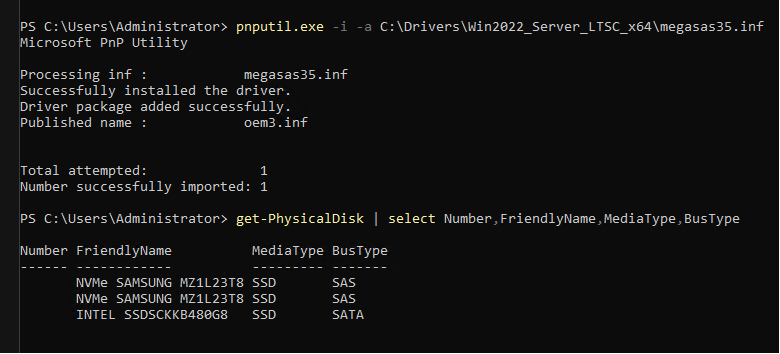
After installing the driver, Get-PhysicalDisk reported the bus type as SAS instead of RAID.
Result#
After the driver update, rerunning Azure Stack HCI validation produced a successful hardware prerequisite check.
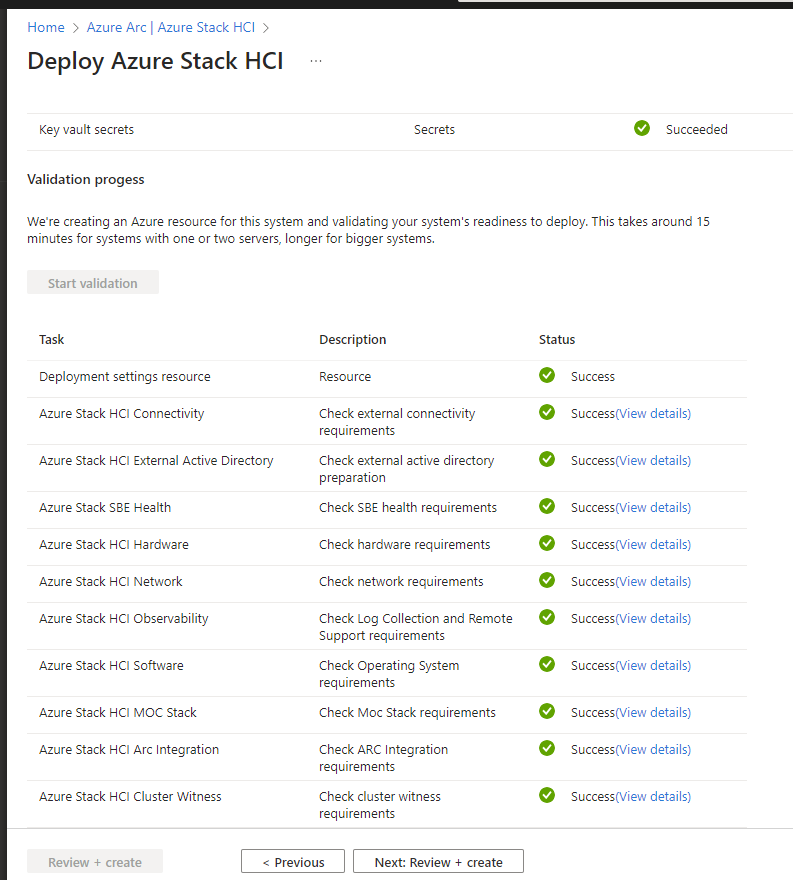
If the same error appears on a JBOD configuration, check the bus type that Windows exposes before changing the storage layout. In this case, the hardware configuration was sound; the missing vendor driver was the problem.